iRobot HOME

iRobot HOME
Category
Lifestyle
| Technical Specification | Download | |
|---|---|---|
| Latest Updated | Apr 16, 2024 | |
| Latest Version | 7.12.0 | |
| Developer | iRobot | |
| Operating system | Android, iOS | |
| Language | English | |
| Price | Free | |
| Available version | 7.12.0 | |
| Version history |
7.4.0 7.3.0 7.2.0 7.1.0-release 7.0.0-release |
|
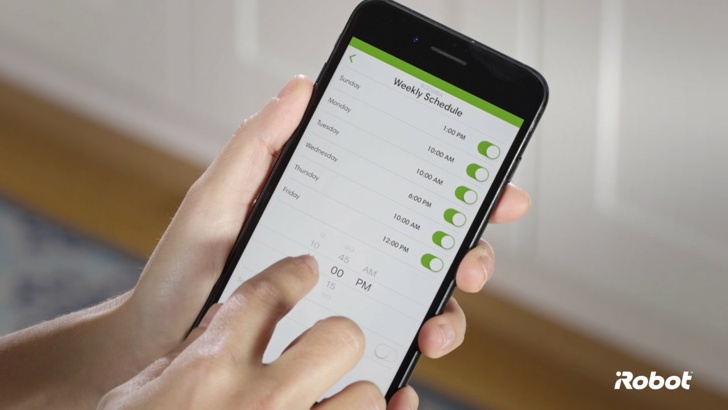
- iRobot HOME is a sophisticated mobile application designed to enhance the user experience with iRobot’s robotic vacuum and mop devices. It offers seamless control over your cleaning schedules, allowing users to customize routines that fit their lifestyle. With real-time monitoring, users can track cleaning progress and set virtual barriers to protect delicate areas. The app also provides maintenance reminders and troubleshooting assistance, ensuring that your devices operate at peak performance. Ultimately, iRobot HOME delivers convenience and peace of mind, transforming home cleaning into a hassle-free experience.
More Details
Below are some of the notable features of the iRobot HOME app:
- Remote Cleaning Control: Users can initiate, pause, or schedule cleaning cycles from anywhere at any time, utilizing their smartphone or tablet. This feature employs cloud-based technology to communicate with compatible iRobot devices, enabling seamless integration with home automation systems and ensuring optimal cleaning performance even when users are away.
- Personalized Cleaning Preferences: The app allows users to customize cleaning settings according to specific needs and lifestyle patterns. Users can set no-go zones using virtual wall technology to prevent the robot from entering specific areas, ensuring that sensitive spaces remain untouched while optimizing cleaning efficiency throughout the home.
- Real-Time Cleaning Reports: The iRobot HOME app generates comprehensive cleaning reports that provide insights into the vacuum’s performance, including areas cleaned, duration of cycles, and battery status. This feature employs data analytics, enabling users to assess patterns in cleaning habits and make informed decisions regarding scheduling and maintenance.
- Smart Home Integration: The iRobot HOME app is designed for compatibility with various smart home ecosystems, including Amazon Alexa and Google Assistant. This feature allows users to control their iRobot devices through voice commands, thereby enhancing the ease of use and providing a more intuitive cleaning experience within the user's connected home environment.
Extra Details
- How to uninstall the iRobot HOME? You can uninstall iRobot HOME on your mobile device by following these steps: Locate setting icon on your phone. Tap Application manager or Apps Touch iRobot HOME. Press uninstall.
How to install the application
How to Download and Install iRobot HOME on Your Mobile Device?
To get iRobot HOME on your Android device, follow these steps:
- Launch the Google Play Store on your phone.
- Search for iRobot HOME using the search bar.
- Pick the correct app from the results.
- Tap "Install" to start downloading.
- Wait until the installation finishes, and you’re all set!
DISCLAIMER
- This app does not modify any system settings on your device, ensuring a safe and seamless experience.
- All APK files on our website are verified and secure, free from malware or unauthorized changes.
- We provide the official Google Play Store download link to guarantee authenticity and reliability.
- Trademarks and logos on our site belong to their respective owners, with no affiliation or partnership implied.
- Our website fully complies with Google's advertising and security policies, ensuring a trustworthy experience.
Steps to Uninstall android App
How to remove iRobot HOME from your mobile device?
If you no longer need iRobot HOME, uninstall it by following these steps:
- Open your phone’s Settings.
- Head to "Apps" or "Application Manager."
- Locate and tap on iRobot HOME.
- Select "Uninstall" to delete the app from your device.
Steps to Uninstall App on Apple devices
Removing iRobot HOME from your iPhone or iPad:
- Find the iRobot HOME icon on your device’s Home Screen or in the App Library.
- Tap and hold the icon until a menu appears.
- Select Remove App from the menu.
- When prompted, tap Delete App to confirm the removal.
- To finish, press the Home button or tap Done to exit the editing mode.
Tips & Tricks
- Leverage the scheduling feature to optimize your cleaning routine. By setting specific days and times for your iRobot to clean, you can ensure that your home is consistently maintained without manual intervention, thus saving you time and effort for other activities.
- Utilize the "Custom Cleaning" option to target high-traffic areas in your home. This feature allows you to focus cleaning on rooms that need extra attention, ensuring that your living space remains tidy and comfortable according to your specific needs.
- Monitor your robot’s cleaning performance through the app’s activity report. This functionality provides insights into cleaning duration and coverage, enabling you to make informed decisions about when and where to clean more frequently.
- Capitalize on the “Virtual Wall” feature to restrict your robot from entering certain areas. This is particularly useful for households with pets or valuable items, ensuring that your robot cleans efficiently while avoiding any sensitive spaces.
- Take advantage of software updates offered in the app. Regular updates can enhance your robot’s performance and introduce new features, so keeping your application and device updated is essential for maximizing its effectiveness and longevity.
Popular APKs See more

ES File Explorer
4.4.1 for Android
Zillow
15.12.0.78176 for Android

Google Meet
2024.04.07.622678568.Release for Android

VeryFitPro
3.5.1 for Android

Adobe Connect
2.6.9 for Android

Photomath
8.36.0 for Android
Top APKs See more

Canvas Student
7.2.0 for Android

Windy.com
41.2.3 for Android

Microsoft PowerPoint
16.0.17425.20174 for Android

Wyze
2.50.2.442 for Android

Kahoot!
5.7.1 for Android

Oxford Dictionary of English
15.5.1105 for Android
Top New Social Apps See more

Mi Fit
6.10.1 for Android

Google Cast Chromecast
3.15.1.4 for Android

ClassDojo
6.24.1 for Android

PlantSnap
6.2.11 for Android
iRobot HOME
7.12.0 for Android

Planet Fitness
9.7.13 for Android