Schoology

Schoology
Category
Education
| Technical Specification | Download | |
|---|---|---|
| Latest Updated | Apr 16, 2024 | |
| Latest Version | 2023.11.1 | |
| Developer | Schoology, Inc. | |
| Operating system | Android, iOS | |
| Language | English | |
| Price | Free | |
| Available version | 2023.11.1 | |
| Version history |
2023.01.2 2022.12.1 2022.11.1 2022.09.2 2022.08.1 |
|
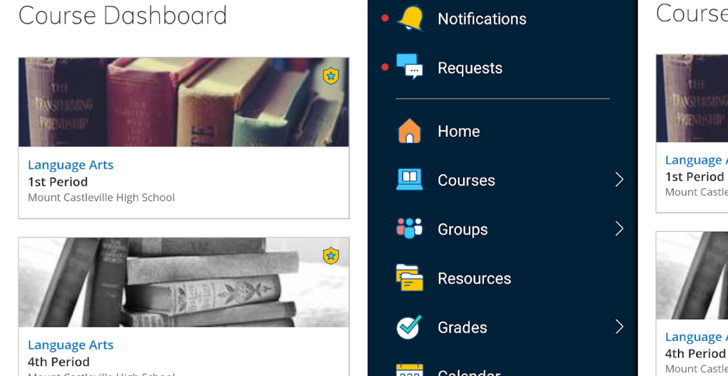
- Schoology is a comprehensive learning management system designed to enhance the educational experience for students, educators, and administrators. It facilitates efficient communication and collaboration through an integrated platform that offers course management, assignment tracking, and assessment tools. Users can easily access resources, submit work, and engage in discussions, fostering a dynamic learning environment. With its intuitive interface, Schoology promotes personalized learning while equipping users with the necessary tools to succeed academically and streamline administrative tasks.
More Details
- Below are some of the notable features of the Schoology app:
- Integrated Learning Management System: Schoology provides a cohesive platform that centralizes all educational resources, facilitating streamlined communication between educators, students, and parents. This system allows for the efficient administration of assignments, grades, and assessments while supporting a wide variety of instructional materials.
- Customizable Course Structure: Educators can design personalized course pathways that cater to diverse learning styles and student needs. This feature allows instructors to incorporate various multimedia elements such as videos, quizzes, and discussion forums, enhancing student engagement and promoting an interactive learning environment.
- Real-Time Collaboration Tools: Utilizing state-of-the-art technology, Schoology enables real-time collaboration through discussion threads, group projects, and peer feedback mechanisms. These tools foster a sense of community among learners and promote cooperative learning experiences, critical for developing essential teamwork skills.
- Robust Analytics and Reporting Dashboard: Schoology’s analytics functionality provides educators with actionable insights through detailed performance metrics and progress reports. This feature leverages data visualization techniques to help teachers identify patterns in student achievement, allowing for informed decision-making and targeted interventions to improve academic outcomes.
Extra Details
- How to uninstall the Schoology? You can uninstall Schoology on your mobile device by following these steps: Locate setting icon on your phone. Tap Application manager or Apps Touch Schoology. Press uninstall.
How to install the application
How to Download and Install Schoology on Your Mobile Device?
To get Schoology on your Android device, follow these steps:
- Launch the Google Play Store on your phone.
- Search for Schoology using the search bar.
- Pick the correct app from the results.
- Tap "Install" to start downloading.
- Wait until the installation finishes, and you’re all set!
DISCLAIMER
- This app does not modify any system settings on your device, ensuring a safe and seamless experience.
- All APK files on our website are verified and secure, free from malware or unauthorized changes.
- We provide the official Google Play Store download link to guarantee authenticity and reliability.
- Trademarks and logos on our site belong to their respective owners, with no affiliation or partnership implied.
- Our website fully complies with Google's advertising and security policies, ensuring a trustworthy experience.
Steps to Uninstall android App
How to remove Schoology from your mobile device?
If you no longer need Schoology, uninstall it by following these steps:
- Open your phone’s Settings.
- Head to "Apps" or "Application Manager."
- Locate and tap on Schoology.
- Select "Uninstall" to delete the app from your device.
Steps to Uninstall App on Apple devices
Removing Schoology from your iPhone or iPad:
- Find the Schoology icon on your device’s Home Screen or in the App Library.
- Tap and hold the icon until a menu appears.
- Select Remove App from the menu.
- When prompted, tap Delete App to confirm the removal.
- To finish, press the Home button or tap Done to exit the editing mode.
Tips & Tricks
- Utilize the calendar feature to keep track of important dates and deadlines. By syncing it with your personal calendar, you can receive timely reminders and ensure you never miss an assignment or class event.
- Take advantage of the collaborative tools within Schoology to enhance group projects. Use discussion threads to brainstorm ideas and share files, fostering effective communication and teamwork among peers.
- Explore the resource library to access a wealth of educational materials. This allows you to supplement your learning with additional resources, ensuring a deeper understanding of the topics being covered in class.
- Leverage the mobile app to stay connected and manage your coursework on the go. This enables you to check grades, submit assignments, and participate in discussions anytime and anywhere, enhancing your overall learning experience.
Popular APKs See more

SHAREit
6.24.68_ww for Android

Tim Hortons
7.1.229 for Android

Google Authenticator
6.0 for Android

SmartThings
1.8.14.26 for Android

McDonalds
8.1.0 for Android

T-Mobile Tuesdays
8.3.0 for Android
Top APKs See more

Mi Home
9.3.700 for Android

MyFitnessPal
24.12.1 for Android

WeatherBug
5.83.0-11 for Android

Planet Fitness
9.7.13 for Android

Dictionary - Merriam-Webster
5.5.2 for Android

Life 360
24.13.0 for Android
Top New Social Apps See more

Strava Track Running, Cycling Swimming
354.13 for Android

Microsoft PowerPoint
16.0.17425.20174 for Android

Microsoft Outlook
4.2413.1 for Android

Kijiji Autos
1.107.0 for Android

Google Cast Chromecast
3.15.1.4 for Android

BBC Weather
4.4.6 for Android